

How I built a daily-load app for business users in Microsoft Fabric with Rayfin and github copilot
Every data platform has one: the pipeline that runs the whole show.
Ours is called PL_Daily. It loads the source systems, processes the domains and makes sure that the data is ready for the day. It's reliable, it's parameterised, and up to now only the data team could start it.
So every time a business user asked "Could you rerun Finance data for AFAS?", someone from the data team had to open Fabric, type the parameters by hand and press Run. It's not difficult, but it does interrupt your day.
This is exactly the kind of challenge I see with customers. And when you’re preparing to hand over a data platform to the internal team, removing those small dependencies becomes even more important. The platform shouldn’t just work technically. It should also be easy for the people taking ownership of it to operate.
So I decided to built a Fabric App that lets users start the daily load themselves. For this i used Rayfin, Github Copilot and the Microsoft Fabric experience.
What we're building
The brief was simple:
- A clean interface that triggers the Fabric pipeline PL_Daily with one button.
- A namespace picker (the source system) that allows one choice: a specific namespace, or All.
- A pipeline picker (the domains) that allows multiple choices, or All.
- The options should straight load from the metadata itself.
Step 0: Install Rayfin
As with every Rayfin project , it starts with install it (if you don't have it alreadt off course).
Open powershell and run:
npm i @microsoft/rayfin-cli
Step 1: Point at the right tenant
First things first: check the tenant.
npx rayfin logout
npx rayfin login --tenant <your-tenant-id>
Step 2: Scaffold the app
Next, create the data app. I called it Daily-Load-APP, because naming things is hard and this one at least says what it does.
npm create @microsoft/rayfin@latest Daily-Load-APP
cd Daily-Load-APP
npx rayfin dev
Step 3: Tell it what you want
This is where it gets fun. Instead of writing the app line by line, I described it to Copilot:
MY PROMPT
"I have built a basic data app, Daily-Load-APP, but I would like the app to create an interface from which it can start the daily load process PL_Daily with just a click of a button. A user should be able to fill in specific parameters for the source systems and domains: par_namespace and par_pipeline.
Note that par_pipeline needs to be filled in as an array: ["Finance", "HR"]. It would be great if the app offers a select list of pipeline options that is converted to an array in the background, so multiple par_pipeline values can be chosen. For par_namespace, only All or one specific namespace can be chosen.
The options for par_namespace and par_pipeline can be found in the lakehouse lh_smart_metadata, in the columns namespace_name and pipeline_name."
Then I watched Rayfin and Copilot build for several minutes. It's like watching someone else assemble your IKEA furniture: satisfying, but you're fairly sure there will be screws left over.
In the meantime, do something else ;)
Plot twist #1: The lakehouse that wouldn't attach
During build and deploy, the app failed to attach the lakehouse:
Blocker: Fabric fails when attaching the lakehouse to the deployed app:
HTTP 500 InternalServerError, surfaced as DAB HTTP 400.
The retry failed too.
Two error codes for one problem, and nothing I could fix from my keyboard. Rather than wait for a support ticket. After that I decided to take a shortcut, and start using a SQL database in Fabric, filled with the metadata by a SQL script.
The lakehouse stays the source of truth; the SQL database is an app-friendly copy that keeps the build moving.
Plot twist #2: Approve, approve, approve
Two things happened as well:
- You approve a lot of actions. Exactly what you want in a client environment, but keep your coffee nearby. you did know this right?
- Not everything can be automated in a client workspace. Because of permissions, Copilot generated the setup scripts and I ran them myself. The AI writes the script; the human with the right permissions runs it.
Using the SQL database
After that detour, the first verification came back:
Success: the deployed app can read the SQL database. The test receives 24 combinations.
The options are in sql_daily_load_metadata. The app uses the new read-only SQL connector. Automatic refresh is not configured yet, so the values are managed manually. The test page is deployed. TypeScript, linting and 5 tests passed. PL_Daily was not started.
I liked that last line!
The agent knew the difference between testing that it could read data and starting a production load. The dropdowns and the start button weren't there yet, but suddenly there really was an app.
Very cool.
Making it pretty and work
A developer test page won't win the hearts of business users. The next prompt covered the looks and the real functionality:
Great that it works. Can you make a nice, light interface for the app? White with the orange theme of the client; see the colours in the image.
Make the namespace choice a single select. One of the options is All, which runs the solution for everything. The pipeline should be a multi-select, or the choice All, which then runs everything (in that case no specific pipelines need to be selected).
Finally, add a run button that starts the pipeline PL_Daily with this input and fills in the requested parameters.
Great work, the app is being created and tested bij copilot!
Add the client's logo, and the app was done! At least, that's what it looked like.
Plot twist #3: The refresh button that timed out
First, the metadata still needs a daily refresh, and Rayfin couldn't complete the authentication for that at the client. Second, the refresh button didn't work: click, wait, wait some more, timeout. :D
The cause: the SQL request took longer than the original timeout of 30 seconds, so the app gave up too early. Copilot raised it to 90 seconds and made the error message say which connection fails. The options now load in about 50 seconds.
The agent was honest about it, too: why SQL is this slow is still unknown. The fix prevents the timeout; it doesn't make the database faster.
Housekeeping: npm audit and pip-audit
Before you hand an app to business users, you clean and improve the code!
Please update the app based on the outcome of running npm audit, and afterwards run pip-audit. Make sure to remove obsolete packages or replace packages that are becoming deprecated. The app should still work as it does now.
The app was redeployed and works as before. All 80 tests pass, and type checking and the production build succeed. Since it couldn't test the signed-in app itself, the agent asked me for a final manual check, without starting PL_Daily.
Nice handover haha.
The finishing touch
Now a last step is to introduce the fact that parameters talk to each other. In other words, the selection of the first shouls limit the second selection.
I have tested the app. It works great, but I would like one adjustment: make sure the second parameter, par_pipeline, only shows the relevant options after a value for the first parameter, par_namespace, is selected.
The result: pick a namespace, and you only see the domains that belong to it.

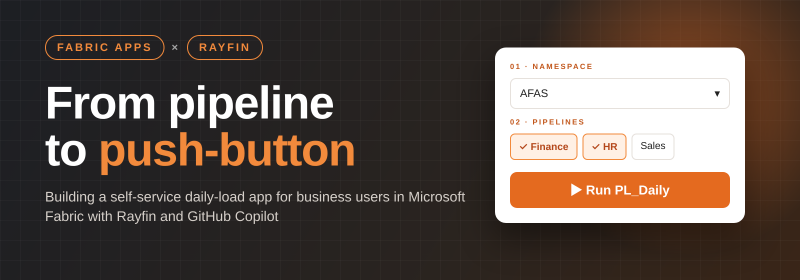
The finished app: choose a namespace, choose your pipelines, and PL_Daily does the rest.
Wrapping up
What's still on the to-do list
- Automate the daily metadata refresh. The authentication at the client still has to be sorted out.
- Revisit the lakehouse connection. Once the attach error is fixed on the Fabric side, the SQL side path may no longer be needed.
What did I learn?
- Write prompts like functional specs.
- Spell out the data contract.
- Have a plan B for platform errors.
- Ask for a security pass before go-live.
- Test like a business user.
To Conclude
What used to be "Hey, could you rerun Finance for AFAS?" is now a self-service app: pick a namespace, tick your domains, press Run.
The data team gets fewer interruptions, the business gets its data when it needs it, and PL_Daily gets started by the people who actually need the data. The internal team can now own this proces!
Was it a smooth ride?
No. But getting from an empty folder to a working, branded, security-checked Fabric app took remarkably little hand-written code. That's the real power of Fabric apps with Rayfin: you spend your time on what the app should do, not on boilerplate.
Next up: automating that daily refresh. To be continued… or not......