


I recently decided to put Claude to the test. Build my first skill and challenge it. For the first time!
Not by asking it random questions, but by seeing whether it could actually help me improve my day to day development process.
One thing I care about in any data platform is consistency. Naming conventions, Python standards, documentation, and clear notebook structures all help make solutions easier to understand and maintain.
So naturally, I wondered:
Could Claude review my Fabric notebooks and automatically apply my own development standards?
Claude Skill Creator
Let's find out! First create a Custom Fabric Review Skill. Inside the Claude App, it is surprisingly easy to start building a custom skill.
You start with:
/skill-creator
And then provide the following prompt.
I would like to create a Fabric skill which reviews my Fabric notebooks code in pyspark and SQL, and update them accordingly to the right naming conventions and Python logic with solid structure. Besides it should add docstring documentation to functions and update the notebook with solid straightforward markdowns. The skill should contain naming conventions for Fact and dimension tables that look like the attached md file.
As a side stept, let's check how good my prompt is.
Copilot prompt coach

Although we are testing Claude it is interesting to see how copilot validates this prompt. A prompt that I entered quick and simple without overthing. In Copilot there is the prompt coach, that will help you structure and improve your prompt.
Running the above propt gave me the following answer.
“Your prompt has a strong objective, but it currently leaves Copilot to decide what “right,” “solid,” and “straightforward” mean. The biggest improvement is to turn those subjective expectations into explicit review rules, define how the attached naming standard is applied, and require Copilot to preserve notebook behavior rather than making uncontrolled changes.”
Eventually it gave me an improved prompt of 160 lines!
WoW, massive improvement!.
But for this demo I skip using it further. I really want to test my skill with just my input.
Claude Skill Creator 2
Back to the skill, I attached several files that contain the standards I use today:
- Semantic model naming conventions for fact and dimension tables
- Python design principles
- SQL development guidelines
During the creation process, Claude asked a few follow up questions to better understand the desired behaviour. After answering those, the skill was generated.
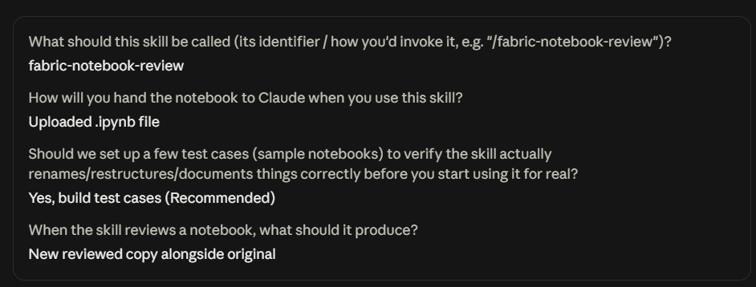
Before moving on, I reviewed the generated skill myself. Once I was satisfied with the result, I asked Claude to make the skill available in the terminal.
So far, so good.

Using the Skill Through Claude Code Terminal
The second test was even more interesting. Could I use the skill directly from Claude Code in the terminal? To get started, I installed Claude Code through PowerShell:
irm https://claude.ai/install.ps1 | iex
After installation, I closed and reopened the terminal. If Claude Code isn't recognized immediately, check whether the installation folder is available in your PATH:
$env:PATH -split ';' | Select-String '\.local\\bin'
If no output is returned, add the installation directory manually:
$currentPath = [Environment]::GetEnvironmentVariable('PATH', 'User')
[Environment]::SetEnvironmentVariable('PATH', "$currentPath;$env:USERPROFILE\.local\bin", 'User'
Then restart your terminal. Once completed, simple Enter: “Claude”, and the application runs. Make sure to log in with your account.
Making the Skill Available
Now came the fun part. I wanted to use the Fabric notebook review skill I had just created. To do this, I asked Claude to make the skill available in my local Claude Code environment:
Make it available in Claude Code terminal, in this location: ...
Sometimes Claude Code doesn't immediately recognize newly created skills. In my case I had to explicitly point it to the skill location:
Use a new skill, it should be installed here: ClaudeCode.claude\skills\fabric-notebook-review
After that, everything was recognized correctly and I could start testing.
Let’s try it!
I submitted a relatively simple Fabric notebook containing a handful of Spark SQL views.
“please validate with the skill: \NB_25_VP”
After several minutes, the review completed and Claude returned a detailed set of recommendations and changes.

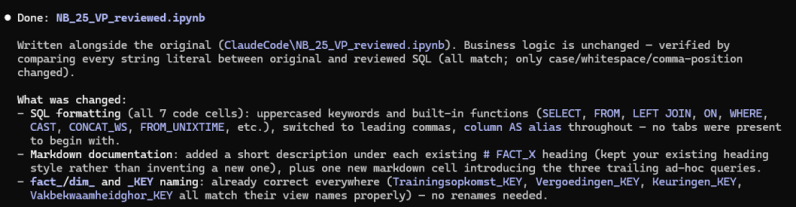
At first glance, things looked promising. But after validating the output, I noticed that not everything had been updated as intended. One example was related to column naming conventions.
Claude reported:
Two competing column-casing conventions exist in the notebook. FACT_1 and FACT_2 use a grouped style (Persoon_Naam_Achternaam), while FACT_3 and FACT_4 use flat PascalCase (EmployeeFullName). The house style calls for PascalCase, but changing all grouped names could potentially break downstream semantic model and report references. Therefore, those columns were flagged but not renamed.
Honestly, this was actually a reasonable decision. The skill understood that blindly changing column names could have consequences. However, my objective was simple, as noted in my naming conventions:
The standard says PascalCase, so PascalCase it should be.
Looking at the notebook, I could see several Spark SQL aliases that had not been updated.
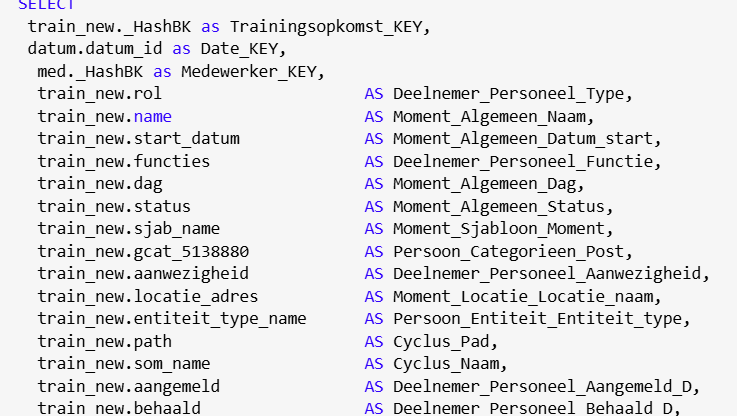
So I pushed Claude a little further.
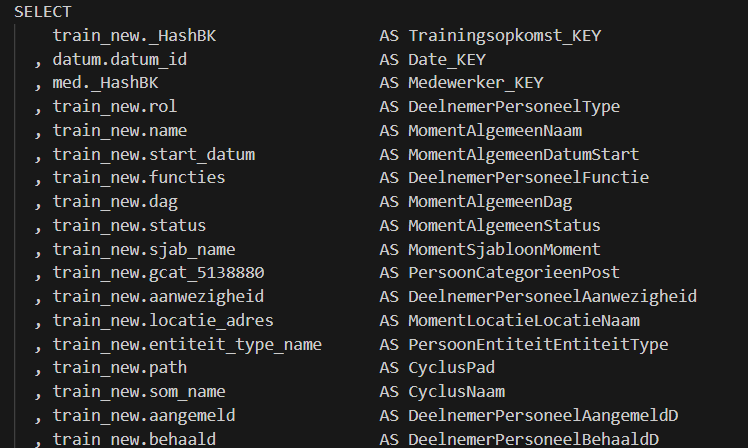
“regarding above check, could you rerun the skill for the notebook and make sure all columns are casted as PascalCase (like EmployeeFullName) since the skill style says this, please enforce this in the query for all”
Luckily, after a few minutes, Claude fixed them all:
Done — all 61 flagged aliases now enforce flat PascalCase
And after verifying the notebook myself, I could confirm the changes had indeed been applied correctly.
To conclude
Did it actually help? This is probably the most important question.
- Did it work as expected? Partly.
- Did it help me? Absolutely.
- Did it save me time? Not yet.
The first run took roughly seven minutes. For a notebook containing just five Spark SQL views, that feels relatively slow. However, there is another side to the story.
While Claude was reviewing the notebook, I wasn't. I could focus on other tasks while the analysis was running. That has value too.
What became very clear is that success depends heavily on context:
- Providing the right standards
- Giving clear instructions
- Ensuring the skill understands what must be enforced
- Validating the results afterwards
For this small notebook, I probably didn't gain any time. My Prompting was not effective at all. And setting up took some time. For larger projects with hundreds of transformations, dozens of notebooks, and stricter governance requirements? That could be a completely different story.
As an Analytics Bridge, I’m always looking for the balance between human expertise and automation.
Claude didn’t replace my judgment. It still needed guidance. But what impressed me was the ability to encode my own development standards into a reusable skill and have AI review code against them.
Will it replace code reviews? No.
Will it improve consistency? Absolutely.
The bridge between standards and implementation just became a little shorter.
Don’t you think?