

What happens when you combine Fabric Apps, AI, a team day and a shoe design contest?
Apparently, you build an app to let your colleagues design your sneakers.
At least, that is what happened to me.
It started with the Data Kicks challenge. I wanted to create my own Data & AI inspired shoe, but simply designing one myself felt a little too easy.
At the same time, I wanted to experiment with Fabric Apps and Rayfin Fabricator. And I had a team day coming up...
Why not combine all three?
Build an app. Demo it to my team. And use their data to design the shoe. Sounds like a plan!
The idea
The idea was pretty simple. Instead of deciding what I liked, I wanted my team to help determine the final design.
So I needed an app where they could:
• Rate different shoe designs
• Choose their favorite colors and styles
• Share their own ideas
• Give me enough input to create one final design
Or, to make it sound slightly more professional: a data-driven sneaker design process.
And this gave me the perfect excuse to try Rayfin Fabricator combined with Fabric apps as well.
At the team day I could then demo the Fabric App and let them fill in the responses at ones!
What are Fabric Apps?
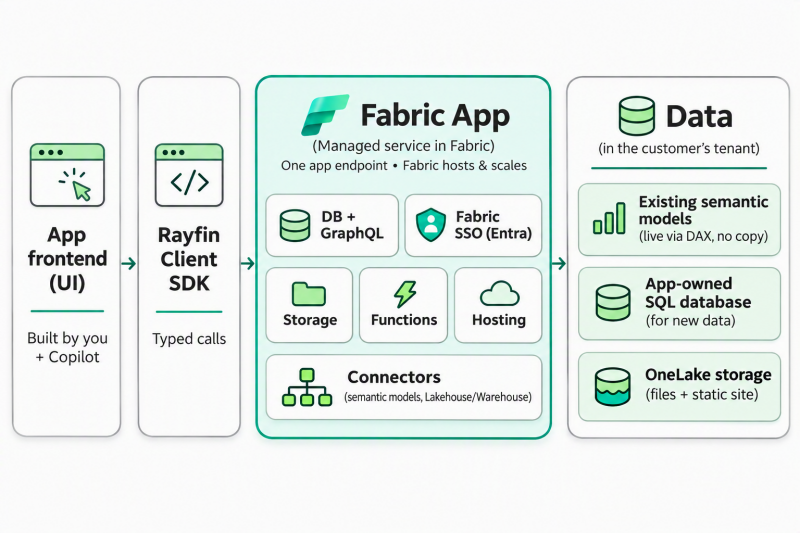
Fabric Apps is built on the Rayfin SDK and enables developers to create data-driven applications on Fabric using a unified development workflow. More about Rayfin can be found here: Rayfin SDK overview | Microsoft Learn
With this, Fabric Apps are a way to turn data and insights in Microsoft Fabric into an application experience for users.
And this is what I find interesting about them. Instead of giving someone just a report, you can create an experience around a specific use case. Data, insights and interaction come together in one place.
I've already experimented with this for more serious use cases, like initiating and monitoring data loads.
But this time? Shoes.
More information can be found here: What is Fabric Apps? - Microsoft Fabric | Microsoft Learn
What is Rayfin Fabricator?
Fabricator helps you build Rayfin apps in one desktop window. It helps you build Fabric Apps with AI. Instead of starting by designing every page, button and component yourself, you start by explaining what you want to build.
Fabricator then asks questions, helps build the application and lets you see the result taking shape in a live preview. This is actually one of the greatest features! You directly see what Rayfin in building. If you don't use Fabricator, you would first need to deploy the app to Fabric in order to see the result. Not helpfull I must say.
More about Fabricator can be found here: What is Fabricator? | Fabricator
So I installed it, and gave it a try for this demo!
Building my shoe-ranking app
I started by describing what I wanted:
An app where users could look at different sneakers, rate them and provide input about the colors, styles and ideas they liked.
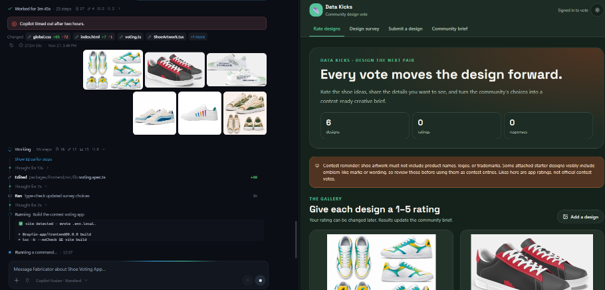
Fabricator asked me additional questions about the application. And while answering them, I could actually see the app being built in the preview. Nice! That was probably one of my favorite parts.
I also added several shoe designs as inspiration. Fabricator used that input to create an actual experience around them. A couple of prompts and questions later, I had something my team could actually use.No PowerPoint. No mock-up. Just build it.
And the UI looked pretty good too!
From team data to shoe design
During our team day, I demoed what I had built and let everyone try the app. They could rate the designs, select what they liked and add their own ideas.
And suddenly this wasn't really my shoe anymore. It was our shoe.
Or, as I like to call it: Crowdsourcing... but for sneakers.
More importantly, I now had something useful: data!
At the end of the process, I didn't just want a ranking saying: "Shoe number 3 wins!"
I wanted to use all that input to create something new.
So the app turns the team's preferences into a written design brief, combining the preferred colors, styles, themes and ideas into a description of what our ultimate shoe should look like.
That brief can then become the input for an AI image generator with the following prompt:
"Create an original, bold shoe concept guided by the community survey. Use the top-rated entry “Fabric fabrics” as inspiration (3.8 out of 5 from 6 ratings). Community direction: main color: Fabric Green; color combination: Fabric Green + White; style: Clean & Minimal / Tech / Data Geek; data influence: Subtle data details; special details: Fabric-inspired colors and data patterns (no logo); community favorite: Entry 04 · Blue tide / Entry 09 · Green mosaic / Entry 02 · Red signal / Fabric fabrics / Entry 08 · Data step / Entry 01 · Teal current / Your Analytical Bridge. Contest rules: no product names, logos, or trademarks. Keep it positive and inclusive. Use bold, solid graphics on transparent backgrounds; customize the side panels, tongue, heel, and toe box only. Leave laces and soles untouched; avoid fine detail and gradients. Prepare type at 12 pt or larger and artwork at 300 dpi or higher; CMYK is preferred. use this shoe as a base:"
And that completes my slightly unconventional data pipeline:
Inspiration → Fabric App → Team input → Data → Design brief → AI → Shoe
Not exactly the data pipeline I normally build. But definitely one of the more fun ones. 😄
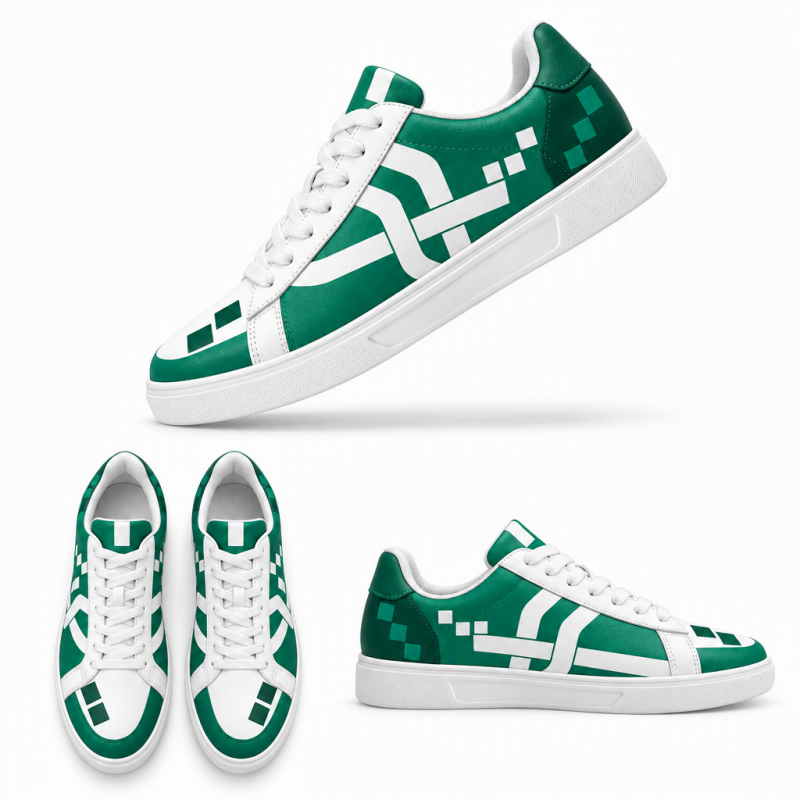
Here's the result!
Three things in one experiment
This project let me try Rayfin Fabricator, join the Fabric Apps and Data Kicks challenges, and demo something new to my team. All with one slightly crazy idea. 😄
And that's what I like about experiments like this: learn something, build something and have some fun along the way.
The result? A shoe designed by my team, powered by data, Fabric Apps, Fabricator and AI. 👟
Would you wear it? 😎